
Radio is a 24/7/365 business. We tend to have a lot of redundant backups as a result, but there’s often a glaring exception: the broadcast studio itself. Studios are expensive to build, and expensive to maintain, so having one that might never be used is a hard sell. After all, how often are you really going to be forced out of your studio?
Well, La Raza Radio in Minneapolis found out the hard way, and we at The Public’s Radio nearly did as well. Early on the morning of June 2, 2020, after a day of peaceful BLM protests, a late night of unexpected looting and rioting occurred. Much of it centered within a few blocks of our offices & studios at 1 Union Station. Our Morning Edition host very nearly couldn’t get into work at 3:30am (and your Intrepid Engineer was in constant touch with him to make sure if he didn’t feel safe, that he could back off and I’d meet him at an alternative location) and several of our office windows that faced Exchange Terrace were smashed by thrown bricks.
We were fortunate. Some staff were (understandably!) a little rattled, but no serious damage was done. Still, suddenly the idea of a backup studio went from “gee that’d be nice” to “we need this and we need it now.”
Making a Virtue Out of Necessity
Fortunately, we’d already been constructing a backup studio at the WPVD 1290AM transmitter site in North Providence for some time already. The COVID19 pandemic already spurred me to wonder what we would do if 1 Union Station were “contaminated”.
The facility at WPVD has some advantages in this arena:
- Our PRSS satellite downlink for NPR, BBC, etc programming is already located there.
- There is a room that was designed to be a studio already in-place.
- We had a basic “backup” Enco D.A.D. automation system already in-place.
- There’s good heating and cooling in-place.
- There’s a backup power generator.
- We have redundant internet in-place, and were already in the process of adding OSHEAN fiber.
- It’s physically distant from 1 Union Station (about 3.5 miles), so any one event that could disrupt 1US is unlikely to also disrupt the backup studio.
- There’s a 10kW AM transmitter on-site; we don’t use it, but in a real emergency we could.
- The structure is physically secure; the first floor is all concrete with no windows.
- Easy parking is available.
So I built on that by doing the following:
- Added a fiberoptic data point-to-point link over OSHEAN between 1US and the backup site.
- Used the PtP link to “marry” the backup Enco DAD to the rest of the Enco DAD network at 1US, meaning instead of a real basic backup automation, now it was full-service.
- Added some additional Axia xNode devices, an xSwitch, and a StudioEngine to expand the existing Audio over IP (AoIP) network to allow for live operations.
- Bought a license for Axia SoftSurface to run on a computer on-site to provide the actual mixer. Got a few spare Acer touchscreens to make it easier to use; it’s not a physical mixer (the StudioEngine does the actual mixing, all in the data domain). Just software that mimics a mixer on the screen.
- Fortunately we had recently upgraded all our computers to new Windows 10 boxes, due to Windows 7 reaching End-of-Life. I keep a computer at all remote sites for easier management of the gear and remote access.
- Added an RE20 microphone, Symetrix headphone amp, Fostex 6301 monitoring speaker, and a Comrex BRIC-Link Gen1 to round things out.
In many of these cases, this was equipment we already had on the shelf for upcoming projects, or as spares, or things that we keep handy if we need them. The capital outlay was pretty minimal, all things considered.
I even managed to program the xNode’s internal mixer so that the one studio can function either as “hot” air studio (i.e. it’s live on the air) or “cold” production studio (i.e. automation is on the air).
Getting the audio from this backup studio to the actual transmitters is tricky; it relies a lot on using a Comrex BRIC-Link Gen2 to stream a special kind of low-delay private webcast over the public internet, which isn’t ideal. But we’ve got redundant ISP connections at each location which helps a great deal.
It’s not perfect, and it will require some fancy footwork to put it on the air; the re-routing of audio at the actual transmitter sites is quite complicated. Plus we haven’t even gotten into the documentation and staff training necessary to make this really work.
But we now have the ability to get back on the air within hours or minutes of a disaster, rather than being off for days, weeks or even months!
Check out some pics below:
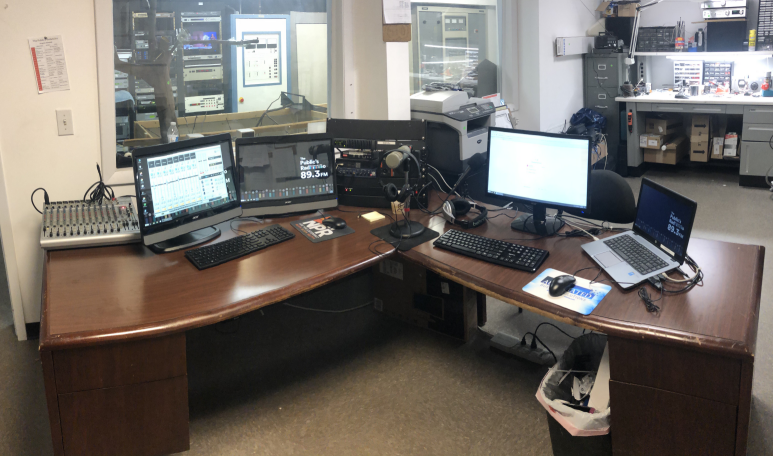
A panoramic image of the Backup Studio. Back in the old WRCP days (pre 1998) this was an actual studio, hence the dual-paned/angled windows. WBUR converted it into an office/workship when they bought it and turned it into WRNI in 1998.
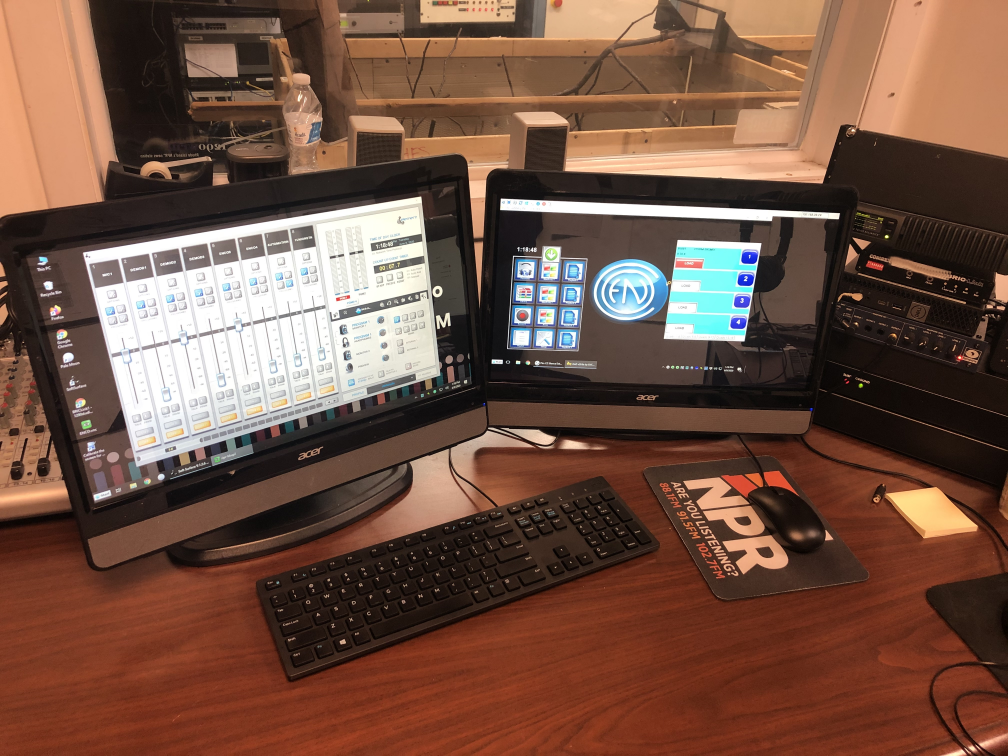
Each LCD screen is a multi-finger touch screen. SoftSurface on the left, Enco DAD on the right. It’s the same computer, just dual-monitors. You can see (top to bottom) an xNode, the BRIC Link, Symetrix headphone amp, Fostex speaker, and a PDU in the little tabletop rack. An RE20 mic rounds things out. Plus the old-school mousepad I had lying around. 🙂 At far left is the external Behringer mix board, just there in case we need to add a lot of extra mics quickly.
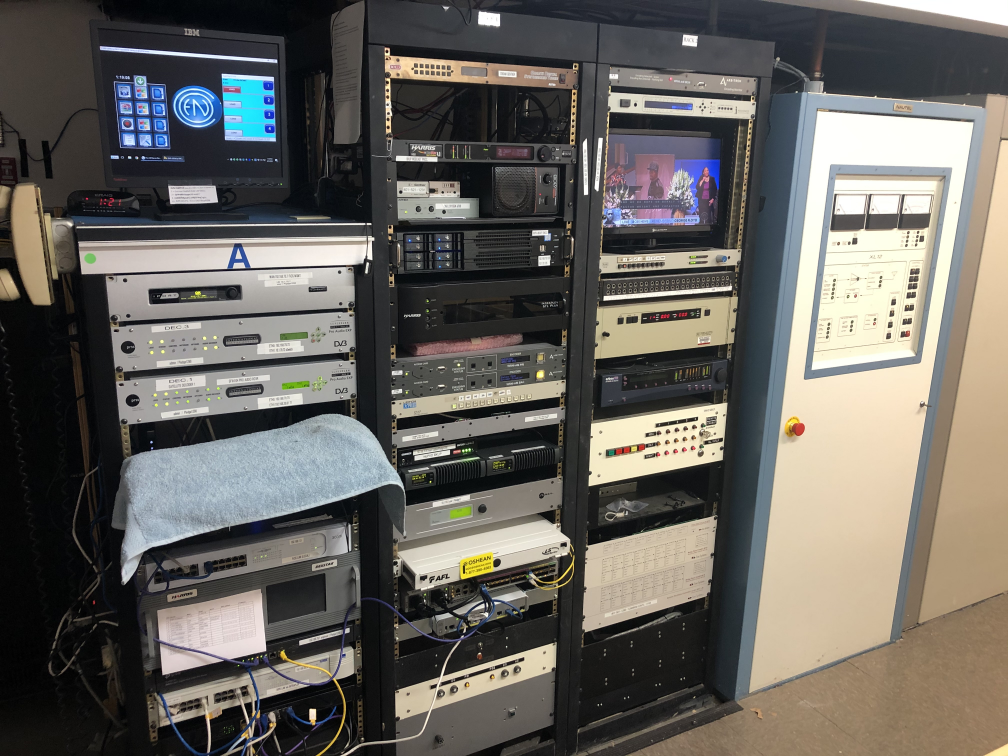
Visible through the windows of the studio itself, here’s the utility racks. This is the transmitter site for WPVD 1290AM; the backup Nautel AM transmitter is the blue/tan box on the right. Some ancillary gear is on the right-hand rack for the transmitters as well. The rack on the right has the two IDC SFX4104 satellite decoders from PRSS; they connect to a 12ft diameter satellite dish out back. That’s how TPR gets its NPR & BBC, et al programming normally. The backup studio is just taking advantage of the fact that the gear is already physically here.
The towel is just to keep dust off the keyboard and mouse. 🙂

Technically the computer running the SoftSurface can be used for internet surfing, social media, email and Google Docs for script writing. But it’s better to keep that separate on a different machine; a spare refurbished laptop is available for that purpose. Also handy for Zoom meetings since it has a built-in camera.

 L & R Broadcast Services
Leave a comment